Monday, May 9, 2011
4. Divide
I chose this picture for divide because the paint samples are divided by different color schemes. Using Picasa, I darkened the picture a lot, then changed the saturation of the colors of the paint samples.
3. Bridge
I went to Klondike to get a picture for bridge. Using Picasa, I put a sepia tone effect on the picture and also put a soft focus on it to focus in on the bridge.
1. Graze
I chose this picture for graze because there are cows grazing all over around where I live. Using Picasa, I cropped the original picture because I wasn't that close to the cows. I also put shadows on the picture and highlights.
Wednesday, May 4, 2011
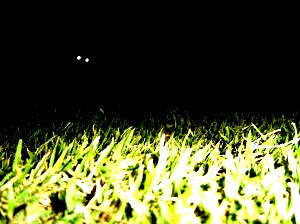
24. Grass
I chose this picture for grass because I thought it looked kinda cool at night cause all you could see was the grass pretty much. Using Picasa, I added a lot of highlights to the picture and darkened the picture so that only the grass would show.
23. Red
I chose this picture for red because there were a whole stack of red phone books sitting in my dad's storage room. Using Picasa, I put a red tint on the picture to make the books appear even redder. I also added a lot of highlights.
38. Water
I showed water in the picture by pressing the buttons on the culligan tank. Using Picasa, I darkened the entire picture to make the water droplets appear better.
25. Blue
I chose this picture for blue because my cd player is a really pretty shade of blue. Using Picasa, I darkened the picture a ton and added a lot of highlights to the cd player so that only the blue would show from the cd player.
Subscribe to:
Posts (Atom)